Buy one, get one free is the most common yet powerful offer business owners use to boost their sales. People often see such sales as beneficial and buy even things they don’t need.
But what if I told you that BOGO isn’t just about “Buy one, get one free”?
While most store owners stick to the classic version, they miss out on powerful variations that can drive even better sales and higher order values.
Imagine a customer adding one item to their cart. What if you could nudge them to buy two more for a bigger reward?
What if you could set up exclusive BOGO deals for your loyal customers or high-value purchases?
With advanced BOGO, the possibilities are endless. So why stick to the basics and why not move beyond the basics and create smarter, more strategic offers.
Need some help? Well, this article is all about that. Stay with us until the end, and we will discuss everything you need to launch your advanced BOGO offers in WooCommerce.
Types of advanced BOGO offers
Before diving into how to set up, let’s get familiar with different advanced BOGO deals. Some of them are discussed below:
- BOGO 50%: This is another common yet powerful BOGO variation. Instead of giving the second item for free, you could offer it at half price. This way, you could clear stocks with better margins.
- Buy x, get y: You may have seen such offers many times. In this type of BOGO, customers must purchase a specific number of items to receive a free or discounted item. For example, Buy 3, get 2 free. This type of BOGO is perfect for promoting related products, such as a free accessory by purchasing a primary product.
- Tiered BOGO: This advanced offer provides different discounts based on the number of items purchased. For example, buy 2 items and get 1 free, buy 3 and get 2 free, or buy 4 and get 3 free. Unlike a simple BOGO deal, this tiered structure nudges customers to buy more by stacking up rewards—boosting sales and the sense of getting a great deal.
- Conditional BOGO: This deal only applies under certain conditions, like purchases from specific locations, using a particular payment gateway or by specific customer (based on email address or user role). It’s ideal for targeting particular items or customer segments.
How to create advanced BOGO offers with Smart Coupons?
Smart Coupons is a powerful WooCommerce plugin that allows you to go beyond basic coupons. It helps you to create advanced promotions like store credits, gift cards, bulk discount, auto-apply coupons, and many more.
Now there are different ways to boost your sales using Smart Coupons. One such powerful promotional strategy is the advanced BOGO offer.
Let’s see some different types of advanced BOGO offers and how you can create them with Smart Coupons.
But first thing first, install and activate Smart Coupons on your WordPress.
BOGO 50%
Buy 1, get 1 at 50% off is one smart way to boost your sales without slashing your profits too much. It’s a perfect mix of a deal and a nudge— encouraging customers to grab more while still feeling like they’re saving.
For example, let’s say you want to offer 50% off on diet coke with the purchase of a pizza. Here’s how you can set it up:
- Go to WordPress Admin panel > Marketing > Coupons > Add Coupon.
- Select Discount type as Fixed cart discount and set the coupon amount to zero.
- Under the Usage restriction tab, go to Products and select Pizza.
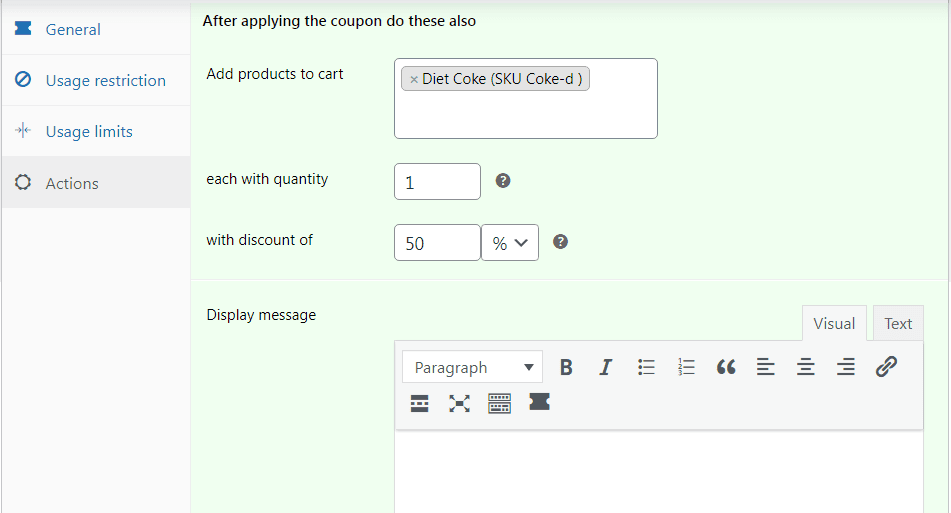
- Under the Actions tab, go to Add products to cart and select Diet coke.
- Set quantity as 1 under each with quantity and enter 50% under with discount of.
- Publish your coupon.
That’s it.
Buy X, get Y
Let’s say you want to offer “Buy 2 Get 1 Free” on your red GAP t-shirts. Here’s how you can set it up with Smart Coupons:
- Go to the WordPress Admin panel > Marketing > Coupons.
- Create a new coupon or edit an existing one.
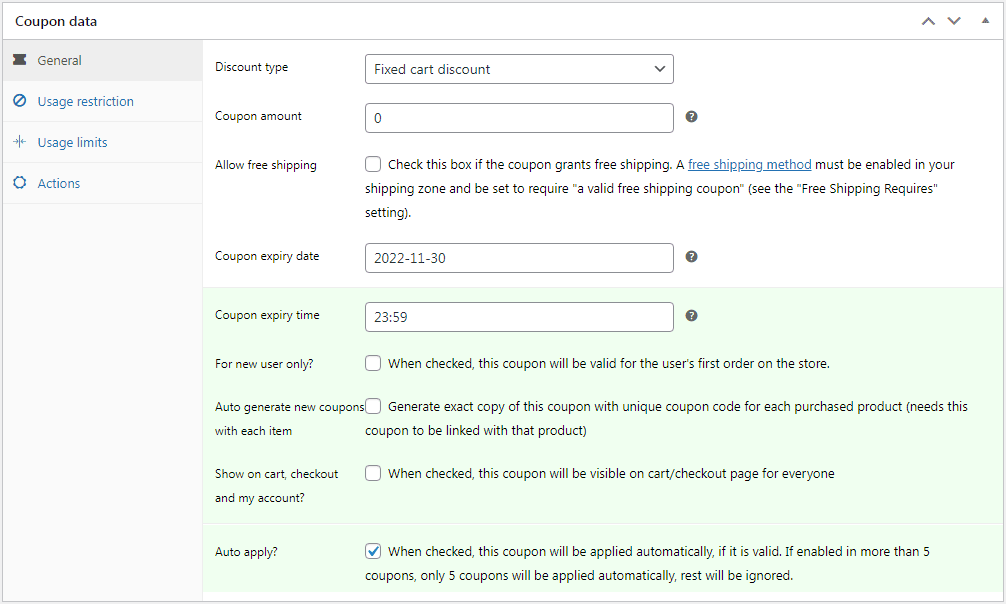
- Select Discount type as Fixed cart discount and enter 0 as the coupon amount.
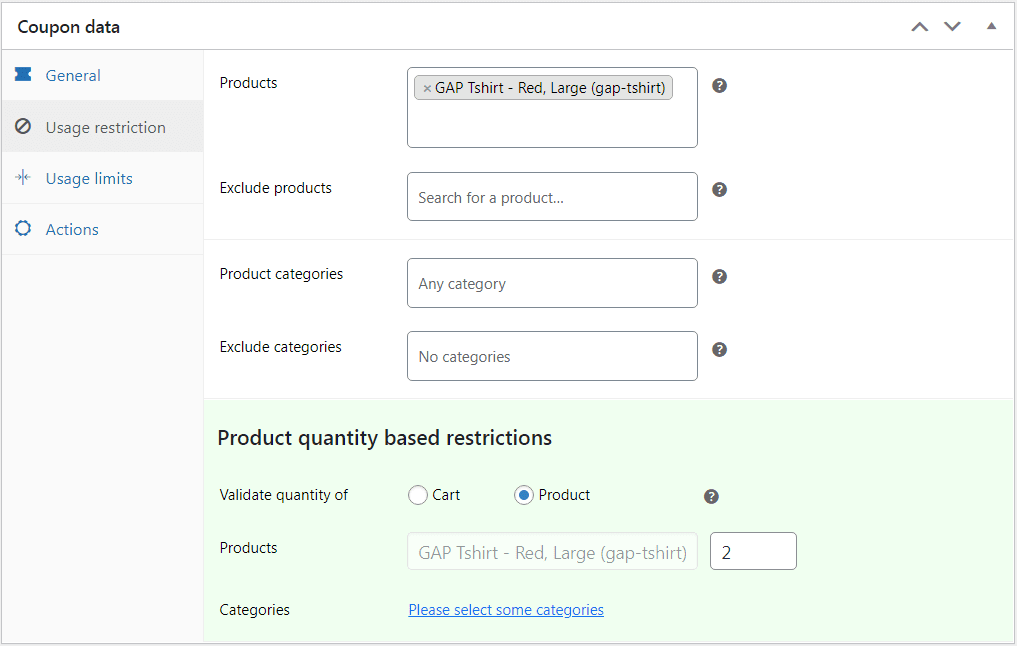
- Under Usage Restriction, add the GAP t-shirt in ‘Include products’.
- Scroll to Product quantity-based restriction, select Cart, and set Minimum quantity to 2.
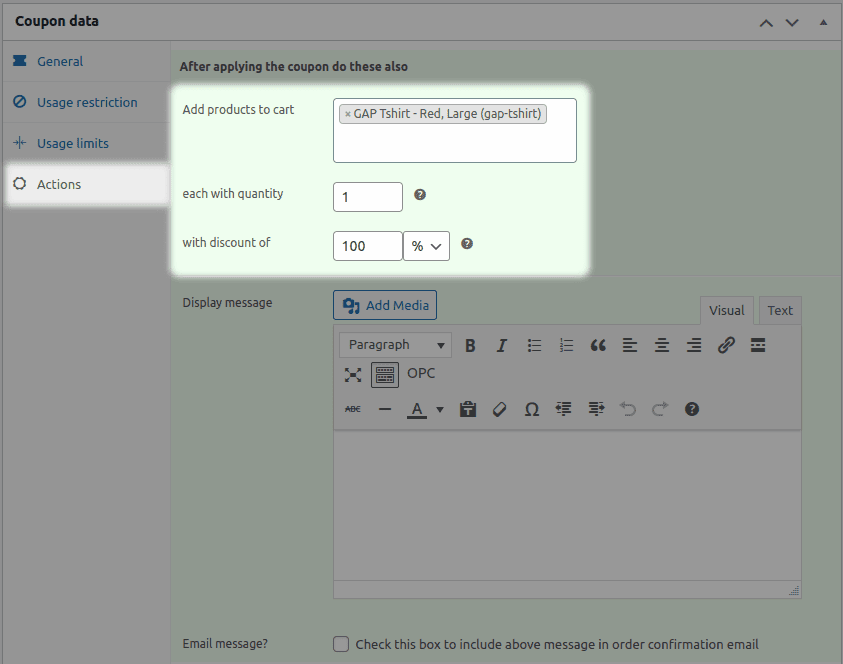
- Next, click the Actions tab, go to Add products to cart.
- Search and choose the GAP t-shirt.
- Set Quantity to 1 and enter 100 under with a discount of.
- Publish the coupon.
And that’s it! You’ve successfully set up a buy 2, get 1 free offer.
Tiered BOGO
Now let’s say you want to incentivize your customers for bulk purchases. So for example:
- Buy up to 3 t-shirts, get 5% off.
- Buy 5 to 9 t-shirts, get 10% off.
- Buy 10 or more t-shirts, get 20% off.
Here’s how to set it up:
- Go to WordPress Admin > Marketing > Coupons> Add New.
- Select Discount type as percentage discount and enter 5 as the coupon amount.
- Enable auto-apply.
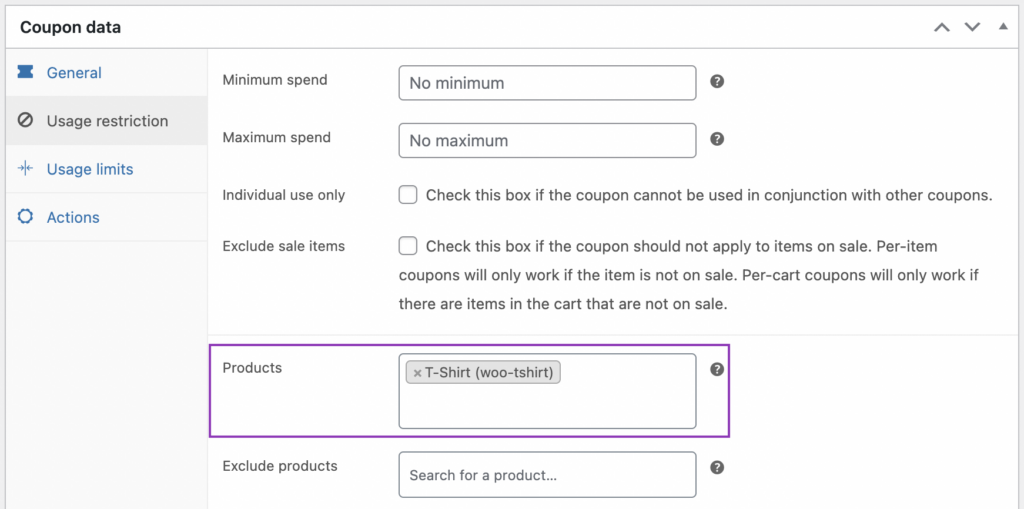
- Under Usage Restriction > Product, select t-shirts.
- Next in Product quantity based restriction, select Product and set the min and max quantities as 1 and 3 respectively.
- Publish the coupon.
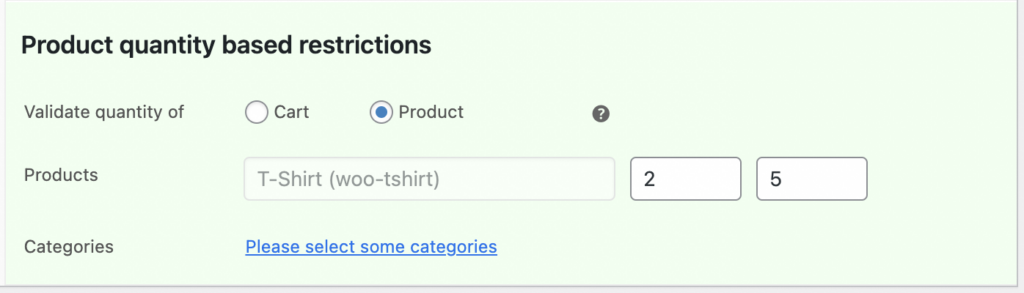
Now, repeat the same steps for the next tiers:
- For 5 – 9 t-shirts: Add a 10% discount.
- For 10+ t-shirts: Add a 20% discount.
That’s it.
Conditional BOGO
Now let’s say you want to offer Buy 1, Get 1 Free on Sneakers, but only for customers in New York City.
Here’s how to set it up:
- Go to Marketing > Coupons > Add coupon.
- Under the General tab, select Discount type as Fixed cart discount and set the coupon amount to zero.
- Under the Usage restriction tab, go to Products and choose Sneakers.
- Next under Allowed location, select New York.
- Choose whether you want to validate the coupon based on the customer’s billing address or shipping address.
- Now, go to the Actions tab. Under Add products to cart, search and choose the same product.
- Since this is a buy one get one free offer, select 1 under each with quantity and under with discount of, enter 100%.
- Publish the coupon.
And you are done.
Key takeaway
Why limit yourself to simple BOGO, when you can do so much more?
Advanced BOGO isn’t just about giving away freebies—it’s about offering smart and strategic discounts that boost sales, encourage bulk purchases, and keep your customers engaged. So don’t wait and try these advanced WooCommerce BOGO deals today. And yes, don’t forget to use Smart Coupons to set up these deals.